
Recognizable project records
Create the measurement project using a client or project name your team can identify. A consistent naming convention helps distinguish repeat visits, different properties and separate work packages.
Organize interior site visits with a clear project name, site location and responsible team member. Keep measurement work connected to the client brief and use verified site information when preparing your quotation.
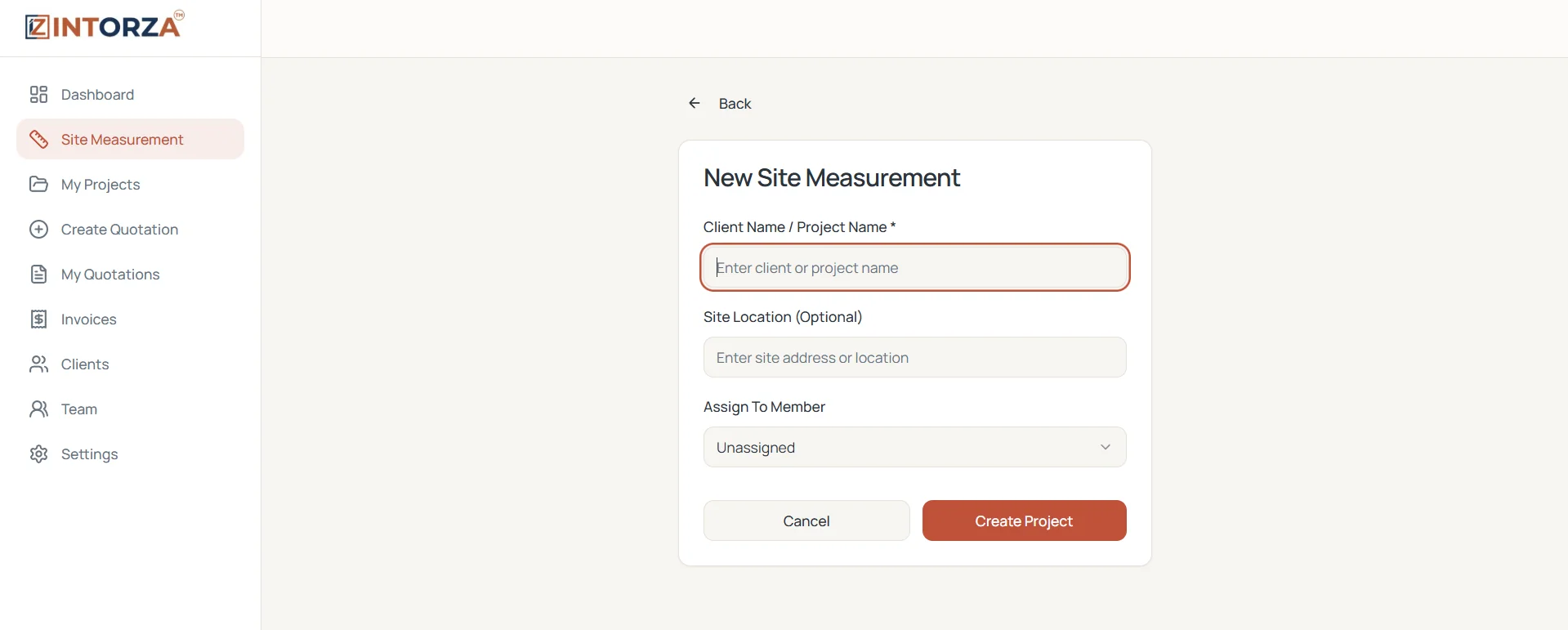
An interior site measurement visit connects a client's ideas with the space your team will actually work in. For a kitchen, wardrobe, apartment renovation or fit-out, that means confirming the required work, checking dimensions and noting the conditions that affect the scope. A clear site project record helps the person visiting the property understand which client and location the visit belongs to.
Intorza's Site Measurement workflow starts with a client or project name, an optional site location and a team-member assignment. The screen shown here creates the site measurement project so your team has a recognizable record and a responsible person. Use that organizational context alongside a consistent field checklist. The measurement advice below describes checks for your team to carry out on site; the software does not replace physical measurement, professional judgment or a final verification before ordering materials.
Create the measurement project using a client or project name your team can identify. A consistent naming convention helps distinguish repeat visits, different properties and separate work packages.
Add the site address or location to the project setup when available. Confirm the details with the client so the visiting team is working from the correct property information.
Assign the measurement project to a team member instead of leaving responsibility implicit. Confirm who will attend, what they need to check and how findings will be handed over.
Use the verified site findings to define the proposal's scope and assumptions. Keep the project context recognizable when moving into Intorza's itemized quotation workflow.
Check the dimensions relevant to the proposed cabinetry and note doors, windows, access, service points and obstructions that could affect the arrangement. Confirm finishes and hardware preferences separately from dimensions so the quotation describes both the size and the specification. Recheck critical measurements before fabrication rather than treating a preliminary visit as the final production survey.
Separate the visit by room and agreed work package. Confirm what the client wants to retain, remove or change, then identify any open decisions that still affect pricing. Distinguish observed site conditions from assumptions in the client's brief. A consistent room-by-room review makes it easier to prepare a proposal that explains inclusions, exclusions and optional upgrades.
Agree how the person visiting the site will communicate measurements, units, open questions and revisions to the quotation team. Check that the information belongs to the correct project and that a revised measurement is clearly distinguished from the earlier value. Review missing details before pricing work that depends on them. Keep supporting field notes in your team's agreed record system.
Sign in to Intorza, choose Site Measurement and enter a clear client or project name. Add the optional location when you have confirmed it.
Choose the responsible team member in the project setup. Confirm the visit scope, client access arrangements and the questions that need answers before the visit.
Measure the relevant spaces with suitable equipment and a consistent unit convention. Check the client's requirements and record unresolved conditions in your field notes.
Use verified dimensions and agreed specifications to prepare the itemized proposal. Recheck quantity units, material assumptions, exclusions and terms before sending it to the client.
These activities help at different stages. Choosing the right starting point makes it easier to explain which details have been verified and which still need review.
Explore the interior quotation workflow to see how the agreed scope becomes a proposal, or ask our team about your requirements.
Explore Intorza Pro for your broader quotation, invoicing and team workflow. Review the plan against your studio's requirements and ask our team about any specific site measurement capability before subscribing.
Cancel anytime · No hidden fees · Instant access
It helps establish the project context for interior measurement work. In the Intorza setup shown here, you enter a client or project name, optionally add the site location and assign a team member. Use those records alongside your team's physical measurement and handover routine.
Yes. The site project setup includes an Assign To Member field. Choose the responsible member and agree the visit scope and handover expectations with your team. A clear assignment makes responsibility visible before the visit begins.
This page describes site project organization, not a phone-based measuring instrument or an automatic room scan. Use appropriate equipment to take dimensions and verify critical measurements on site. Do not treat a project record or screenshot as a measurement guarantee.
No. Site measurement checks the actual property and its conditions. AI floor plan analysis starts from a drawing to help prepare a quotation draft. The AI output requires review, and it does not remove the need to verify the physical dimensions and agreed scope.
Confirm the rooms and work packages, relevant dimensions and units, openings, service points, obstructions and installation access. Note client decisions and unresolved questions. The exact checks depend on the proposed work; verify critical information before fabrication and final pricing.
Verified dimensions and site conditions help your team define quantities, material requirements, installation assumptions and exclusions. Carry that scope into the quotation, then review units, rates and terms before sharing the proposal. Use the sample quotation format as a document checklist.
Explore the relevant tools and guidance before choosing the next step for your project.
Connect site responsibilities with project teams, member records and attendance.
Connect measured scope and accepted proposals with the converted project record.
See the separate drawing-based and project-details routes for an editable quotation draft.
Check how specifications, quantities, rates and terms come together in a client proposal.
See recorded quotations, projects, clients and payments in the wider business overview.
Use an early budget example before confirming the detailed site scope and specifications.
Open Intorza and choose Site Measurement to set up the project. If you need help connecting site visits to your quotation workflow, talk to our team.