
Quotation overview
Review quotation counts and the pending, accepted and rejected status summary. Use the quotation list to identify a proposal that needs a client decision or an updated scope.
See your interior business overview in one workspace. Review quotations, converted projects, clients, team members and recorded payment totals, then decide which project or client needs attention next.
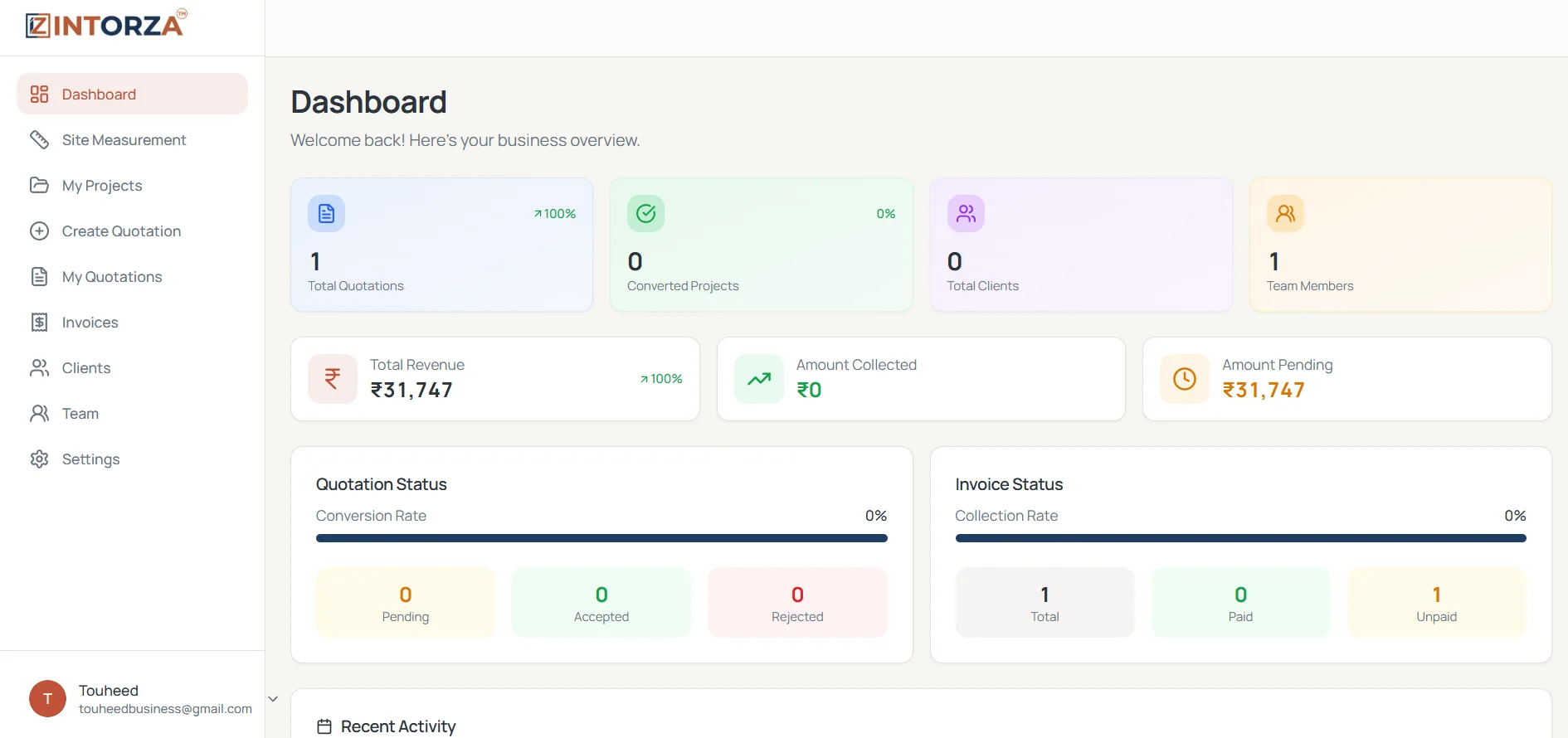
An interior studio can have several conversations happening at once: a new quotation awaiting review, an accepted project moving into execution and an invoice waiting for payment. An interior design business dashboard brings the recorded status of that work into a shared overview. It gives owners and project managers a starting point for deciding what to follow up, rather than opening every project before the day begins.
Intorza's dashboard shows total quotations, converted projects, clients and team members alongside revenue, amount collected and amount pending summaries. Quotation and invoice status panels help distinguish proposed work from recorded billing and collections. The value is in seeing those records together and opening the relevant workflow when something needs review. Figures reflect the information entered in your workspace; keeping the underlying records current remains part of the team's routine.
Review quotation counts and the pending, accepted and rejected status summary. Use the quotation list to identify a proposal that needs a client decision or an updated scope.
See how much work has moved into projects and review the associated project records. Keep proposal follow-up separate from the coordination needed once a client accepts the work.
Compare recorded amount collected and amount pending with the invoice status summary. Open the supporting invoice or project before contacting a client about an outstanding balance.
Review client and team totals alongside the work in progress. These counts provide context for the business overview; individual client records and team assignments explain who is involved.
Check quotations that still need a decision before treating them as confirmed projects. Agree which person will follow up, what information the client needs and whether the proposed scope is still current. A status panel is useful when it leads to a specific next action. Avoid changing a proposal to accepted simply to clear the pending list; record the decision after the client confirms it.
A project can be active while an invoice is unpaid, and a client payment can be recorded before all work is complete. Review the project and billing records together when planning the next conversation. The dashboard provides a summary, while the detailed record supplies the quotation, invoice and payment context needed to understand the figure.
Before relying on a summary, make sure quotations have the right status, client records are recognizable and payments have been entered against the correct work. Ask the team to update changed details as part of their normal handover. Consistent records make the next review easier and reduce the chance of following up on work that has already moved forward.
Sign in to Intorza and choose Dashboard. Review the quotation, project, client and team totals to establish the current workspace context.
Look at the pending, accepted and rejected summary. Open the quotation workflow to review any proposal that needs a decision, revision or client follow-up.
Compare invoice status with the recorded collection and pending totals. Check the supporting details before deciding whether a reminder or correction is needed.
Record the result of the review in the relevant workflow. Revisit the overview after updating the source records so the next team member works from the same context.
These summaries support different business decisions. Read the label and open the detailed record rather than treating every figure as the same measure of performance.
Explore the interior quotation workflow to see how the agreed scope becomes a proposal, or ask our team about your requirements.
Review Intorza Pro for unlimited quotations, invoicing and team collaboration alongside your business overview. Choose a plan based on the workflows your studio needs; ask our team about any specific requirement before subscribing.
Cancel anytime · No hidden fees · Instant access
It is an overview of the records used to run an interior studio or contracting business. Intorza brings quotations, converted projects, clients, team totals, invoice status and recorded payment summaries into one dashboard so you can decide what to review next.
The dashboard shown here includes total quotations, converted projects, total clients and team members. It also displays revenue, amount collected and amount pending summaries, plus quotation and invoice status panels. Open the corresponding detailed records to understand a particular total.
A small team can use the overview to review proposal decisions and billing records without first opening every client or project. Start with clear naming and a routine for keeping statuses and payment entries current; those habits make the summaries more useful as work grows.
This page describes the recorded business overview, not a bank-reconciliation integration. Check your own payment evidence and update the relevant records before relying on collected or pending figures. A dashboard summary should not be treated as a live bank balance or profit statement.
Yes. Intorza includes quotation and invoice workflows in the same product workspace. Use the dashboard for an overview, then open the relevant quotation, project, client or invoice area to review the details and take the next action.
Use a representative client and project to review the relationship between a quotation, its recorded decision and any associated billing. Ask the team to follow the same status conventions. Contact Intorza if you need help understanding the plan or workflow before adopting it.
Explore the relevant tools and guidance before choosing the next step for your project.
Review accepted work alongside quotations, invoices and recorded project totals.
Understand invoice balances, partial payment records and outstanding amounts.
Review each client's projects, billed amounts, payments and balance before follow-up.
Create site project records, add a location and assign responsibility before preparing a proposal.
Turn a verified scope into an itemized proposal with quantities, rates and client terms.
Ask about dashboard records, plan options and getting started with your team.
Open Intorza to explore the dashboard, or talk to our team about connecting your studio's quotation, project and billing workflow.