
Project identity
Recognize the project by its name, client and location. Confirm those details before reviewing documents or discussing the next step with the team.
Review converted interior projects with their client details, associated quotations, invoices and recorded financial summary. Give your team a clear starting point for understanding the agreed work and billing context.
Once an interior quotation moves forward, the team needs more than the final proposal total. They need to recognize the project, understand the client context and find the related records when a question arises. Interior project management software can give that work a consistent place in the business workflow instead of leaving each handover dependent on a separate conversation.
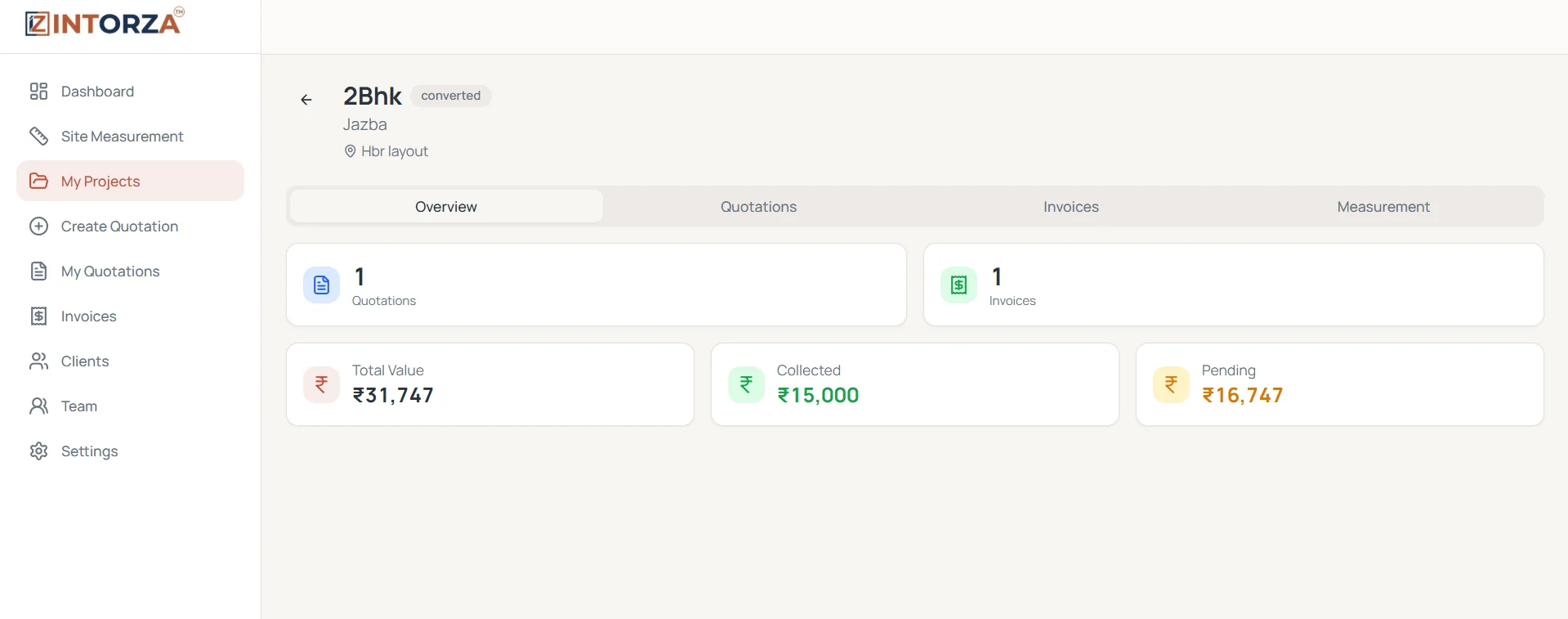
Intorza's My Projects screen shows a converted project with its client and location, tabs for Overview, Quotations, Invoices and Measurement, and a summary of recorded total value, collected and pending amounts. Use the connected record to find the right supporting documents and your delivery handover to agree the next practical action. Check the source records when you need to understand what a total represents for the actual project.
Recognize the project by its name, client and location. Confirm those details before reviewing documents or discussing the next step with the team.
Use the project's quotation area to review the proposals linked to the work. Check that the scope you are discussing is represented by the correct quotation.
Open the related billing records when a payment question arises. Keep an invoice's recorded position distinct from the status of the physical work.
Review recorded project value, collected and pending totals together. Open the supporting records before relying on a summary or contacting a client about a balance.
When a proposal becomes a project, review which work was accepted and which choices remain open. Give the receiving team the client and location context as well as the relevant quotation. Identify exclusions and optional upgrades clearly in the supporting proposal. A recognizable project record helps people find that information, while a careful handover explains the decisions behind it.
If the client asks about a charge or a revised scope, open the associated quotation or invoice rather than answering from the summary alone. Check whether the question concerns proposed work, recorded billing or a payment entry. Keeping those documents connected makes the discussion more focused, but the team still needs to review which record is relevant to the particular question.
For studios handling more than one property, establish a naming convention that distinguishes the client, site and work package. Check the individual project record when reviewing a collected or pending amount. Use the business dashboard for a wider overview and return to the project for its supporting detail. Do not treat a client-level total as the balance for every project belonging to that client.
Review the quotation decision and agreed scope before moving the work into your project handover. Make any unresolved client choices explicit.
Choose My Projects in Intorza and open the relevant record. Confirm its name, client and location before relying on its summary.
Use the quotation, invoice and measurement areas for the context available for that project. Check the underlying details when something needs clarification.
Update quotation or payment records where appropriate and communicate the next action through your team's agreed process. Revisit the project summary after reviewing the source information.
The project overview connects several kinds of records. Each supports a different question about the work.
Explore the interior quotation workflow to see how the agreed scope becomes a proposal, or ask our team about your requirements.
Review Intorza Pro for the wider quotation, invoicing and team collaboration workflow. Choose a plan against your actual project-document and coordination requirements, and confirm any specialist scheduling needs with our team.
Cancel anytime · No hidden fees · Instant access
The project overview shown here includes a converted project, client and location, associated quotation and invoice areas, a measurement tab and recorded total value, collected and pending amounts. Use it to connect the supporting records for a particular project.
Yes. The project screen includes separate Quotations and Invoices tabs. Open the relevant record to review a scope or billing question instead of relying only on the overview total.
A recorded pending financial amount is different from a task-completion status. Review the invoice and payment context for balances, and use your team's delivery process to establish which physical work remains to be completed.
No. It describes the connected project record demonstrated in the screenshot. Specific scheduling, dependencies, resource planning or advanced reporting requirements should be confirmed with the Intorza team before you rely on them.
Use distinct names and check the client and site for each record. Review associated documents at the project level, then use the business dashboard for a broader overview. Consistent naming and handovers reduce confusion between different properties or work packages.
Start by confirming the client brief and site information, then prepare and review the quotation. Once the client has confirmed the scope, use the accepted proposal as the context for the project and billing handover.
Explore the relevant tools and guidance before choosing the next step for your project.
Keep proposal status and confirmed scope understandable before the project handover.
Explore invoice records, payment entries and outstanding balances.
Review project and billing summaries from the client's perspective.
Connect team members and project assignments to clearer responsibilities.
Open Intorza and review My Projects, or talk to our team about connecting proposals, project context and billing for your studio.