
Recognizable clients
Use clear client naming so the team can distinguish similar names, separate properties and repeat work. Check the intended client before discussing project or payment details.
Keep interior client context connected to projects and recorded billing. Review each client's project count, total billed, paid amount and outstanding balance before the next conversation.
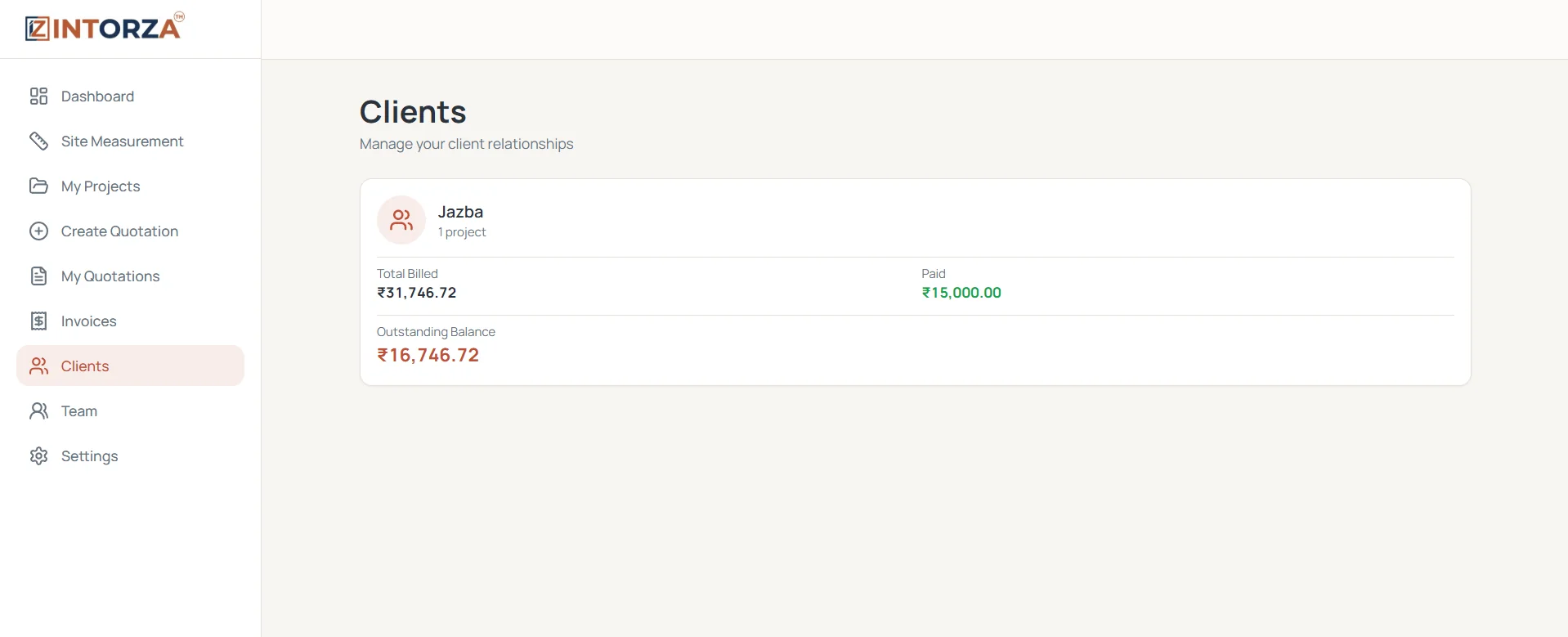
A client conversation rarely fits into a name and a single total. An interior studio may be discussing a new quotation while an earlier project still has a billing question. A CRM for interior designers should make the relevant client context easier to find, so the person responding can distinguish the property, project and outstanding record before giving an answer.
Intorza's Clients screen brings the client name and project count together with total billed, paid and outstanding balance summaries. Use this client view as an entry point into the recorded business relationship. The client-management workflow focuses on the project and billing context your team needs for an informed response. Review the relevant project or invoice when you need to understand how a summary was formed, and keep your team's contact and handover information current in its agreed record system.
Use clear client naming so the team can distinguish similar names, separate properties and repeat work. Check the intended client before discussing project or payment details.
Review the project count alongside the client record. Open the relevant project when a question concerns a specific property, proposal or work package.
See recorded total billed and paid amounts from the client perspective. Use the supporting invoice records when the client asks about a particular charge or payment.
Review the recorded outstanding balance before a follow-up. Distinguish a client-wide summary from an individual project's invoice so the conversation stays specific.
A repeat client may have more than one site or work package. Start by confirming which property and project the conversation concerns. Use a consistent naming convention so a proposal for a new apartment is not confused with an invoice from earlier work. The client summary offers relationship context, while the project and document records explain the particular matter being discussed.
Before raising an outstanding balance, review the latest recorded payments and the relevant invoice. Check whether the client's question concerns the total billed, an entry still awaiting review or a different project. Resolve differences against the supporting documents rather than treating the summary as the whole explanation. This keeps the conversation grounded in recognizable records.
Agree how your studio records the outcome of a client conversation and who is responsible for the next response. Give the receiving team member the client and project context rather than forwarding an unexplained total. Use a consistent communication record process so the person taking over can review the client's question, the supporting project information and the next agreed action.
Open Clients in Intorza and identify the relevant record. Confirm the name and project context before discussing the work or recorded balance.
Check the project count and the billed, paid and outstanding summaries. Identify whether the question is about new work, an existing project or billing.
Review the associated project, quotation or invoice for the specific question. Compare the supporting information with the client-level summary where needed.
Communicate the result clearly and update the appropriate source records. Follow your studio's process for maintaining conversation context and assigning the next response.
Each view helps at a different level. Moving between them gives the team context without mixing separate client conversations.
Explore the interior quotation workflow to see how the agreed scope becomes a proposal, or ask our team about your requirements.
Explore Intorza Pro for the connected quotation, invoicing and team workflow around your client records. Review the particular client-management and integration requirements your studio has before choosing a plan.
Cancel anytime · No hidden fees · Instant access
It helps keep the client relationship understandable alongside the work being discussed. Intorza's demonstrated client view focuses on clients, project counts, recorded billed and paid amounts, and outstanding balances. Use project and document records for the supporting detail.
The Clients screen shown here includes total billed, paid and outstanding balance summaries. Review the relevant invoice and payment entries when you need to understand a specific charge or the basis for a follow-up.
Use clear names to distinguish the properties or work packages. Start with the client overview for context, then review the relevant project and associated documents. A client-wide outstanding total should not be treated as the balance for each separate project.
This page describes the client/project/billing overview shown in Intorza. It does not establish messaging integrations, automatic campaigns or email synchronization. Confirm any integration you require with the Intorza team before relying on it.
Use it as a starting point before a client conversation: confirm the record, identify the relevant project and review the supporting billing or proposal details. A consistent routine is more useful than treating the summary as a substitute for the underlying records.
No. It provides a relationship-level overview. The quotation explains the proposed work and terms, while the invoice and recorded payments explain billing. Open the relevant document before answering a detailed scope or payment question.
Explore the relevant tools and guidance before choosing the next step for your project.
Find the documents and financial summary for a particular project.
Distinguish a client's pending proposal from accepted work.
Use the billing record to explain the client's recorded balance.
Make responsibilities clearer around project work and client handovers.
Open Intorza and explore Clients, or talk to our team about organizing project and billing context for your studio's relationships.